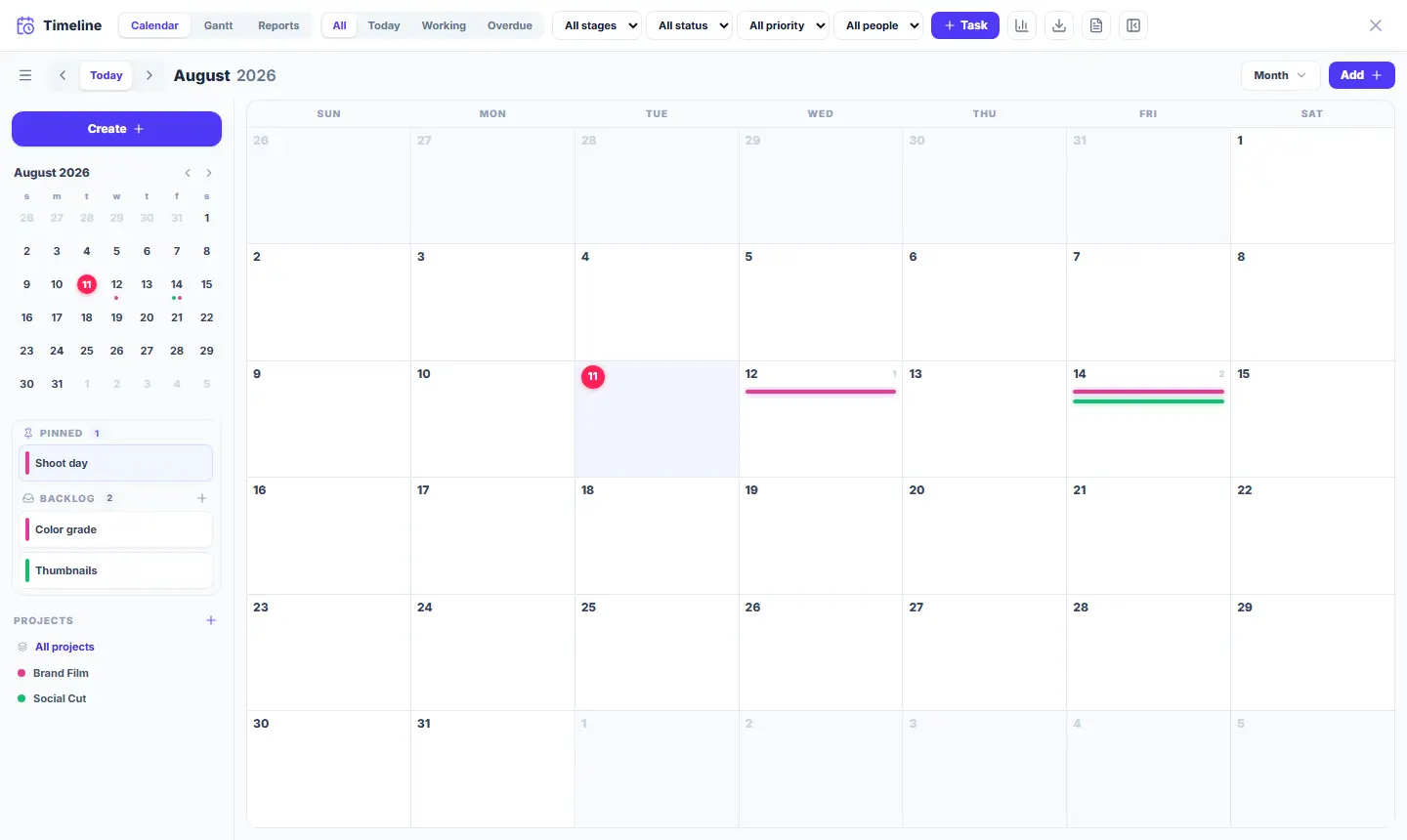
Wailyspace is two connected surfaces. The CANVAS is an infinite visual space for boards, notes and references. The CALENDAR is where production happens — tasks, deadlines and time. Projects tie the two together.
The canvas — your visual space
- The left toolbar adds cards: Note, Heading, To-do, Folder, Column, Comment, Document — and "More" opens media (image, video, audio, link, table, sketch, map, file) and diagram shapes.
- Double-click any empty spot for a quick note.
- Move around: hold Space and drag, or scroll with two fingers on a trackpad. Zoom: pinch or Ctrl/Cmd+scroll; on Windows, the mouse wheel also zooms.
- Drag cards to arrange them; drag a card’s edge handle onto another card to draw a connection wire.

The calendar — your production hub
- Choose "Timeline" in the bottom dock to open the compact calendar, then "Expand" for Calendar, Gantt and Reports. To add a direct full-view shortcut, use the left toolbar’s Menu → Show on the toolbar → Timeline.
- The full calendar’s navigator rail has "Create task", a mini-calendar, your PINNED tasks, and the PROJECTS filter.
- Colored bars on days are tasks — the color comes from the task or its project.
- Click any project chip in PROJECTS to see only that project’s tasks; "All projects" clears the filter.