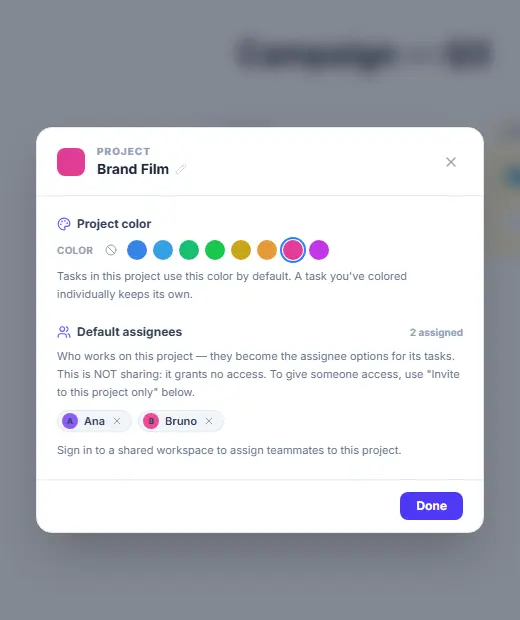
Folders organize the canvas; PROJECTS organize work. Only projects appear in the calendar’s filters, carry a color and default assignees, and can be shared piece by piece.
Reading the sidebar
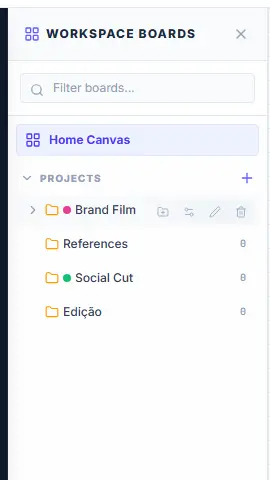
- Choose "Boards" in the left toolbar or bottom dock to open the boards sidebar. "Home Canvas" is your main board.
- Under PROJECTS: entries with a colored dot are projects ("Brand Film", "Social Cut"); indented rows are sub-projects ("Edição" inside Brand Film); plain rows are ordinary folders ("References").
- Hover a row for its actions: add sub-project, share, settings (projects only), rename, delete.
- The + next to PROJECTS creates a new project. The Folder tool on the canvas creates a plain folder — not a project.
Set up a project
- Click the gear on a project row (or in the calendar’s PROJECTS list).
- Pick a project color — its tasks inherit it on the calendar (a task you color individually keeps its own).
- Add Default assignees: the people who work on this project become the assignee options for its tasks. This grants no access — it is not sharing.
- Sub-projects: hover the project row → folder-plus icon. A sub-project’s tasks count toward the parent project in filters and reports.